Friday, 11 December 2015

artist website/online portfolio and 3d/virtual gallery

responsive website, artist portfolio

This website portfolio showcases the technical and artistic exploration of Tristan Griffin from 2011 to 2015. Acting as a first point of contact and center for Tristan's social networks.

Tristan Griffin 2015


For project 4/capstone project the outline was to produce a website which would function as our portfolio, to design and create a ‘portfolio’ website which showcases works produced within the course and/or your ideal profession (ie print journalist, graphic designer, photographer, video editor, etc). The portfolio can be used as an online resume showcasing your skills. The portfolio can be done in any software of your choice, but needs to be handed in as a link, and it was not to be in a CMS . The portfolio needs to utilise creative aesthetic.


My arts practice focuses on the relationship of religion, contemporary society and the human condition and I explore this concept through various mediums, including painting, drawing, printmaking, sculpture and now digital. The website will need to reflect my artistic approach.
My intention for the website was:
  • Act as a first point of contact
  • Act as a center for my own social networks and creative practice
  • Be responsive and web/mobile friendly
  • Display my technical abilities in traditional and digital mediums
  • Reflect who I am and what I do
  • Minimalise functional elements, such as menus


The website has only the minimum essential pages, these being
  • Selected works
  • Image Archive
  • Contact page
  • About/CV
  • Links to 20 blogger pages ( artwork/event content details )
This restriction is to minimise the visitors chance of getting lost in the content.
Instead a large amount of content has been added into these four pages. The Selected works page is also the landing page of the website presenting visitors with my artworks.


To create the website the following code languages were used:
HTML, all pages
CSS, all pages
Jquery, selected artworks/image archive
PHP, contact page
Javascript, selected works/image archive


Break down of page content
Shared page content
The menu found on every page uses a left slide out menu. The intention was to hide as much of the basic funtionality of the website as possible. When opened the menu pushes the content (which is in a container) to the right to reveal the menu and social share buttons. Facebook, google plus and Pintrest were my choices of social networks as these are the ones I use the most ( excluding instagram ).


Selected works Page
This page is presented in a psudo 3D gallery environment. And is navigated by clicking on the left and right buttons found at the bottom of the screen
  • Features 15 artworks
  • Each artwork has a didactic panel located under left/bottom of the artwork
  • each of these didactic panels is then linked to a blogger page which contains more images and content for the artwork. Tho in the case of interactive artworks the link will take the visitor to the artwork.


Image Archive page

This page is displayed as a seamless tiled image gallery and features 80+ artworks created between 2012 – 2015. By clicking on a thumbnail image a jquery popup is opened with an enlarged image and the gallery is dimmed to focus on the artwork.


About/CV page
The CV content covers only my fine arts practice since 2011. The contact form sends an email to tristan.griffin@hotmail.com using the mailer.php file ( ive chosen not to use captcha as I personally find it annoying, I may change this if I receive spam from the website)

Contact page
This page has two purposes, to provide links for myself to my social networks (facebook, pintrest , youtube, griffith university and instagram ) and to act as a contact point for potential clients.


NB: The use of blogger as the linked content from the selected works is to take advantage of monetising the pages with adsense. This is building apon the pages already created in the interactivemedia group project website.
www.tristangriffin.info is hosted by hostPapa.com, their servers are not compatable with filezilla ( not supporting TSL connections ) the alternative was smartFTP.com.


Rationale and research

Choice of main page functionality
For the general functionality of the website, particularly the landing page, I was interested in a non-traditional aesthetic. I initially researched image mapping with generators such as http://imagemap-generator.dariodomi.de/. I moved onto parallax menu movement using CSS3 to provide depth (provide link and screen shot) tho I found that this method was resource heavy and detracted from showcasing my artwork. The next step was to create a website which would scroll horizontally.
This was inspired by the aesthetic of http://soulwire.co.uk/experiments and http://www.secrettechnology.com/ web design layout.

This horizontal scrolling layout can be found at www.artworkprocess.com/tristangriffin/horizontalScrolling/index.html.


The biggest problems with this layout was the load time due to the need for all the large images having to be buffered on loading and the 3D animated dropdown menu that I had implemented. It used jquery which overrode a lot of content additions ie image popups. The menu also pushed the content downward which, due to the horizontal scrolling on the website, meant that the content would not be accessible or viewable.

To solve the menu I implemented a pure css menu which required some html markup to create the menu list and a container for the content, and the rest was handled with CSS styling. The advantage of this type of menu is that I did not have to be worried about jquery/javascript/php/css code conflicts. It is simple, clean and mobile friendly.

The next step was to search for a gallery system which would showcase my selected artworks. I explerimented with MANY carousel galleries, popout/up panels etc. I chose to explore 3D css galleries choosing the 3D image gallery room from tympanus.net (http://tympanus.net/codrops/2013/01/15/3d-image-gallery-room/ ) which I then modified/repaired to suit my needs as it was not properly responsive and had a few bugs ( which was noted on the website).

To shrinking images for thumbnails and creating webfriendly images ( some were over 5MB ) I used a free thumbnailer program. The thumbnails have been used in the Image Archive to improve load time : Images max size 1000px H/W thumbnails max size 200px H/W.


I had difficulty finding a solution to popups for image viewing. I experimented with w3 schools jquery popup windows (http://www.w3schools.com/jquerymobile/tryit.asp?filename=tryjqmob_popup_image), but found that making the image/window responsive was sluggish. The final solution was intergrate fancybox (http://fancyapps.com/fancybox/ ) . This solution is responsive and mobile friendly (and for the future has the capability for adding a caption).

“fancyBox is a tool that offers a nice and elegant way to add zooming functionality for images, html content and multi-media on your webpages. It is built on the top of the popular JavaScript framework jQuery and is both easy to implement and a snap to customize. “ (fancybox 2015)


The final time intensive implimentation was the Social networking buttons. Most were designed for CMS applications like wordpress, tumblr, joomla etc. For example www.addthis.com and www.sharethis.com . I ended up creating my own inspired by the base code of https://simplesharebuttons.com/html-share-buttons/.


Social share buttons for facebook, google plus, pintrest and twitter.


Conclusion
The creation of this portfolio has been useful as a tool to assess my own own skills and professional growth. Having all these artworks and write ups gathered in one space allowed me to see what I have accomplished, strengths, weaknesses, and identifed what might need improvement. But more importantly has assisted in helping me determine the direction of my future practice, this being the intergration of digital into my long term arts practice and maintaining my arts diversity while explore my conceptual development further.
As is the case with any part of an online presence, just creating a portfolio is not enough. It is going to need to tweaked and updated as time goes on. Due to time restrictions there were a few features that I was unable to add that I will be adding in the near future:
  • adding of descriptions to images in the Image Archive , and social 'like' buttons
  • adding of sound to the interface buttons on hover
  • expanding the CV to include previous job activities OR creating a table system which relates to specific professional fields. IE fine arts, technology, management.
The purpose of creating the online portfolio is so others could see it. Promoting my website will be important. I will need to include a link to my portfolio on resumes, cover letters, business cards, social media profiles, e-mail signature, article biographies, and presentations.


Dynamic CMS (content management system)

responsive website, dynamic CMS

Tristan Griffin 2015


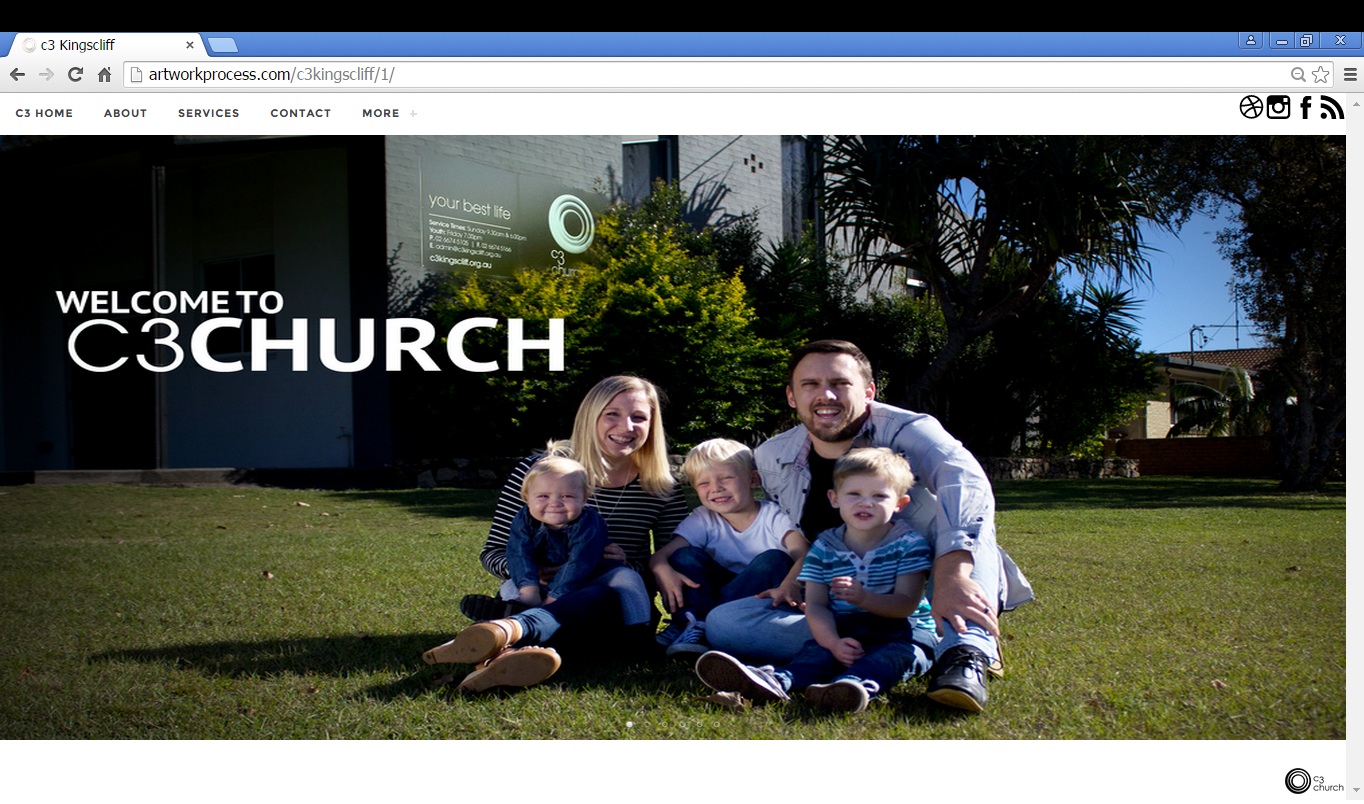
Church websites act as a first point of contact for many people, so need to be welcoming and
informative. It’s scary visiting a church for the first time. You don’t know what to expect. The
website needs to explain the type of church, what they believe, when and where the services are
held, who is on staff, and how the children’s ministry works and enable Listening and watching of
sermons. And for those who attend regularly, what events are on and how to connect with others.
Most of all they want to feel welcomed and invited to visit. And for the purpose of the internal
teams the website needs to be able to be update content easily with minimal risk of damaging the
website.

Studio Interactive Project : “students are provided with a design brief for an interactive website/app, which they must then follow the brief, use all of the skills they learned in and outside of class to build the work. “ My intention is to create the website for this assessment. And I intend on collaborating with photography student Megan Boyl to assist in the creation of the website image assets, and liasing with Emmett Goddard(music director c3) and senior pastors of c3 kingscliff, Steve and Kristy Godfrey.


After initial contact with the senior pastors of C3 Kingscliff to assess their needs, sitting down with them and creating a design brief.(found here) The intention was to create a responsive website that is structured (themed and core content set) but can have restricted content added and modified by someone with essentially no technical skills (If they are capable of using social media (facebook) then they will be able to update the website.) Content for example:sermons, new events coming up ( posted as a single image which is animated on a css3 slideshow on the main page and is intergrated to all of the churches social media automatically).

The aim of the website is to proved members/visitors with an inviting point of contact via the internet/social media and provide staff with an easy to use tool to assist in their areas of ministry.

Once the public layout of the website had been constructed the website was made available to C3
administration and a and follow up meeting was made with C3 senior pastor Steve Godfrey. During
this meeting the layout was discussed and minor changes were made, and a mudmap of how the
content editor would function was presented and approved. I was also given the C3 movement style
guide documents which included color guides and logo styling and placement


Brief description of how the project was executed

In keeping with the design brief and needs of the c3 church, ive created a website which addressess
all areas of the default c3 corporate church outline. These areas being: Home page, conferences,
services, ministries, groups, projects,colunteer, media , music and shop. And extended to include a
volunteer, contact, connect groups and calender page.
The public webpage is responsive ( mobile/tablet device friendly ) with accordian frames to
minimise page scrolling and uses a dynamically generated menu and content system for all pages. It
intergrates the churches social networks which can be found at the top right hand of the menu
system ( desktop mode) and the churches google calender can be found on the calender page.
External links from the website include the media library, ( which uses a content library and player
from libsync.com), the c3 shop and music center . Also as part of this website is the connect groups
page, which contains the details of all c3 Kingscliff connect group leaders ( previously
unavailable ). Additionally the website includes an extensive CMS. This enables the editing of key
content, with a simplistic text and image editor.

Note : the front end of this website is ready to go live, the admin editor needs further testing before
being commecially ready. The estimated time line is july for the front end being live after content
has been gathered and entered. The estimated launch is august for the admin console to be publicly
accessible.

Rationale and research
Importance of church websites
A church website is the front door of a church for many, many people. If you’d put a greeter at the
front door of a physical church, and line up ushers in the sanctuary, and set up a hospitality center in
the lobby, and make sure all the signs are attractive and pointing in the right direction, then you
need to take the same care with your church’s website.
People will form opinions about your church from the first image that pulls up on their screen.
They want to know the type of church, what you believe, who is on staff, and how your children’s
ministry works. They even want to listen and watch sermons so they can check it out before they
come. Most of all they want to feel welcomed and invited to visit. It’s scary visiting a church for
the first time. You don’t know what to expect.

other CMS available for churches
I researched the recommended CMS for churches to make sure that I wont be reinventing the wheel.
LightCMS, wordpress, pagelime, halogy, expression engine, ekklesia 360 and squarespace are the
most popular for small church website development. Ekklesia 360 is currently the only CMS that
was build specifically for churches but cost starts at $500 for use of a template. Most services didnt
not offer true responsive web designs and for a novice were quite complicated to use

A brief history of CMS and where this CMS fits in the timeline
CMSs have been available since the 1990s, and has seen three clear phases of development. 90s -
2000 marked by the DotCom crash, 2000 - 2013, 2013 to present. Early CMS applications written
by web design agencies rather than software companies and every agency had their own platform.
An example of this is 'Roxen' released in 1994 by swedish developers Roxen Internet Software.
The second wave of CMS platforms were developed by specialist software houses such as RedDot,
DotNetNuke and Mambo(now Joomla). Key features which were built in included WYSIWYG text
editing, search engine optimisation, improved HTML and graphical user interfaces that allowed
web development with minimal coding and what is now the standards for content
(image,file,page,database and text) management.
The latest CMS plaforms are either focused at top end and are feature laden OR feature what had
previously had to be done by a programmer server-side with back-end code can now be achieved
entirely with front end client side applications.
The CMS created for this project is the later, everything is done entirely through a client side
application and requires next to no code from the user, with the exception of adding web links to
input fields where required.
Visit http://interactivemediacmsgroupproject.weebly.com/history-of-cms.html for more
information.

How a CMS functions
Most modern websites use some form of content management system (CMS ). Typically, a CMS
consists of two elements: the content management application (CMA) and the content delivery
application (CDA).
The CMA element allows the content manager or author, who may not know Hypertext Markup
Language (HTML), to manage the creation, modification, and removal of content from a Web site
without needing the expertise of a Webmaster.
The CDA element uses and compiles that information to update the Web site via a database,
commonly SQL. The features of a CMS system vary, but most include Web-based publishing,
format management, revision control, and indexing, search, and retrieval. The CMS for this project
uses the same structure of CMA and CDA, with the exception that the CDA does not create a new
HTML/PHP file when saving datablocks, instead it saves the content of the HTML/PHP file and
retains the original files.

Technical
as part of the interactive media group project a detailed/interactive description of how this CMS
applications database functions can be found at http://artworkprocess.blogspot.com.au/p/how-towcms-
web-content-management.html

How the website works
The website consists of two levels of access, public access and administrative access. Meaning that
each publicly accessable page has a corresponding administrative page which enables priveledged
users to edit the content of publicly accessible pages. Typically a CMS would rewrite the entire
webpage every time content is altered. For this project I chose to have the content dynamically
updated using a mqsqlite database and image database. Use of this type of database and technique
means that if an error occurs in the database, only that part of the content is effected, instead of the
entire page. Also this database type enables simple installation, this being the simple copying to the
server, and the website and database works ( NOTE: the destination server needs PDO and mysqlite
installed, which should be on all contemporary/uptodate web hosting services )
Admin console
Once the admin console has been accessed it will check to see if the administrative account session
has been logged in. If not the page will redirect to the adminLogin.php file. If the session exists the
page will proceed with being loaded. The admin console is then loaded and the default page for
editing is loaded into the consoles IFRAME. The admin console allows editing of public page
access and menu content, selection of IFRAME content for editing, account management and the
previewing of the website in mobile and desktop modes.

 Admin console
Once the admin console has been accessed it will check to see if the administrative account session
has been logged in. If not the page will redirect to the adminLogin.php file. If the session exists the
page will proceed with being loaded. The admin console is then loaded and the default page for
editing is loaded into the consoles IFRAME. The admin console allows editing of public page
access and menu content, selection of IFRAME content for editing, account management and the
previewing of the website in mobile and desktop modes.


 Admin login
This is a PDO login script that accesses the mysqlite database with a simplistic interface , once the
password has been accepted a server 'session' is created and the user is then redirected to the admin
console


Admin pages
The admin pages act in the same way as public pages on initial loading, they access the database,
load the content into a buffer variable then override the pages default content. Each of the admin
pages allows the editing of its content through a simple text editor and image uploader. Once the
content is added and the 'save' button is pressed the new content is added to the server. This inturn
updates the public website.
NOTE: currently after editing content, for it to be displayed on the current page, the page needs to
be manually refreshed, also the text editor does not currently show the content that was in the
datafield that is to be edited. This will be updated in the release version of the software.

Public pages
Every time the public pages are loaded they access the database, load the content into a buffer
variable then override the pages default content. The only common content that is overridden on all
the pages is the menu list, this is so the administrator can enable or disable a page entirely. It is
important to not that only webpages that are located in the 'MORE' tab can be disabled, key pages
such as C3 home, about, services and contact page are locked/essential content pages. While the
public pages can access the database, they cannot write data to the database. To access the database
a user “session” needs to be created on the server and the admin interface files must be accessed.

Design and layout of the pages
When considering how to implement the design brief, I had to consider how it would look on
mobile devices as well as desktops ( including tablets and various sized phones as well as Iphone
and Android ). Additionally I had to consider how each of the pages would be edited, keeping in
mind that they had to be minimal and simplistic in design.
The most difficult pages for me to design to edit were the accordian pages as the content is
dynamically added and removed from the frame. I had initially intended on having all the content
viewable for editing simultainiously, which would have been an easier solution. But I instead
decided to allow the content to be added within the frames. So that the person editing could see how
the content looked once edited without needing to view the public site. To achieve this method of
editing a global page selector variable is created when opening the frame and this is used as an
identifier for the text and image database save function.
The image below shows the accordian frame content editing buttons.


 The following is a visual comparative table of the public and corresponding administrative pages of
the website in desktop mode. Also find notes in this table about specific features unique to those
pages

 Public pages                                                                         Admin pages
About page


 All content ,titles , descriptive content and images can be editing including the contents of each of
the accordian frames

 Calender


 This page places google calender into an iframe, or essentially any other calender system the user
wishes, for this example I am using my own google calender. The content of the iframe can be
altered by clicking the edit button to the top left in the admin console.


 Conferences


 All content ,titles, discriptive content and images can be editing including the contents of each of
the accordian frames

Connect groups 


The admin panel displays all available frames to be edited, currently the rows are limited to 20,
which equates to 20 different groups. More rows can be added dynamically due to the nature of the
PDO database. The public page only displays the rows that are filled with content.

Contact


The content on this page can be edited, the email address for the 'contact' form is currently set to
'tristan.griffin@hotmail.com'. This can be changed in the editor (currently disabled).

Home/index page


The slide show has been limited to 6 image as requested by C3 senior pastors, each of the images
can be replaced in the editor, once replaced the new image is shared on social networks
automatically as described previously ( share feature disabled for marking purposes )

Media


This page contains a live feed from Libsync.com as well as external links to the download links to
past sermons, iphone app, andriod app and the podcast which is updated weekly. In the editor all
of these links can be replaced ( the media player link, which is an iframe is locked in size due to
the player itself not being responsive )

Ministries


All content ,titles, discriptive content and images can be editing including the contents of each of
the accordian frames

Services


All content ,titles, discriptive content and images can be editing including the contents of each of
the accordian frames

Training / c3 college EXTERNAL LINK


Music EXTERNAL LINK


Shop EXTERNAL LINK

Social networking
Social networking has been intergrated into two sections of the website, one being in the social
networking bar which is readily visible. The second being when a new image is uploaded into the
front page of the website (NOTE: this feature has been disabled for marking purposes).
The social networking bar is a simple page redirect


For the second application when the image is uploaded a call is made as follows.
function socialShare(imagePath)
{
window.location.(“http://www.facebook.com/sharer.php?u=http://c3kingscliff.org.au/images/” +
imagePath );
javascript:void((function()%7Bvar
%20e=document.createElement('script');e.setAttribute('type','text/javascript');e.setAttribute('charset'
,'UTF-8');e.setAttribute('src','http://assets.pinterest.com/js/pinmarklet.js?
r='+Math.random()*99999999);document.body.appendChild(e)%7D)());
}
This is called from the image upload function and then shares the new uploaded image with social
media platforms (note the user will need to be logged in to each network and will be prompted to
login with each service ). In this example it shares with facebook and pintrest.


Problems faced and updates needed before final release
Admin console
A huge problem that I faced initially was the intergration of a WYSISYG text editor into the
interface. The accordian menu which is updated using jquery does not allow for raw HTML to be
added into the frames. Ie any syntax with a ' & or “ would cause a crash, which was problematic as
generally white space is written as   or %20. So heavy modification of the output from the
text editors and word filtering/conversion had to be made. This means that bullet points, font
changes, justification, divs etc cannot be added into the text field through HTML code. The syntax
is limited to <p> , <h1 – 6> , <b> , <br> , <strong> . Which is written under the displayed text
area. Also the original WYSIWYG editor through up a major error as seen in the image below


This text editor had worked offline and I had intergrated it into every page, but failed online. I had
to replace the editor with a java html text area editor. Which works effectively.

Currently after editing content the page needs to be manually refreshed, also the text editor does
not currently show the content that was in the data field that is to be edited. The problem is begin
caused due to the method used to save to the database , for secure writing to the server the GET
function has to be called to the server, which results in a page call function being used, while this
works, it does not allow for automatic updating of the page content. To fix this problem a page
refresh will need to be done (in code) from the server side after the data has been updated OR a
jquery/ajax update needs to be made after writing to the database, the same goes for when an image
has been updated. This change will need to be made to all admin pages.

Creation of the database application
In the early stages of creating the CMS I was getting a PDOException error of "could not find
driver". I was using godaddy.com as the host. I was able to create the mysqli database and write to
the database But unable to UPDATE ($sql = "UPDATE data SET page_text=text WHERE
page_id=1";) or DELETE ( "DELETE FROM data WHERE page_id='1'"; ).
On recommendation from Skye I sent an email forr advice, to ash guy (QCA staff member) for
advice regarding the error but thankfully I was able to resolve the database issue before receiving a
response ( which I never received, the email probably got shoved into junk due to the file
attachment and html link ). I since have found out that web hosting services do not allow images to
be stored in databases, it is not considered a breach of contact as they believe that it causes server
delays. My solution was to save the file path into the server and store the images regularly on the
server.


Interactive Media 2015 - Written statement

Tristan Griffin s5006448 :: Interactive Media 2015

The following document will explore the technologies, code and software explored during first semester of 2015. Please refer to Journal website for examples, you will find them categorize in the menu by week, then by class activity, group activity and homework. There are approximately 25 inclass examples and 38 homework examples provided in the digital Journal.

Over the course of the semester we covered the basics of creating a HTML code structure and how to use the HTML elements in conjunction with CSS and Javascript. The basics of website file structure was also addressed, for example CSS, JS and IMAGE folders and how to intergrate them into the HTML code. The use of Sublime text editor assisted in the creation and editing of the HTML, CSS and Javascript files. We were also introduced online services such as GitHUB, codepen, w3 school, codrops and CSS diner which assisted in our learning and development.

In week 4 we were introduced to responsive layout design, creating an experiment with the 'responsive man', this extended eventually into full responsive website layouts which can be assisted by online responsive generators such as www.responsivegridsystem.com or throught the use of templating such as Bootstrap. I have since made an effort to make all my web based creations responsive as people will often be viewing content on mobile devices in preference to a desktop environment.
Quite alot of time was spent on intergrating CSS into our website content. We explored basic CSS element control ( changing and applying attributes such as color, size, shape, z-index and position ), as well as CSS animations and transformations (week 7 – 8 ). I extended this exploration with the creation of a program that displays an image as text (http://artworkprocess.com/textify/index.html ). To achieve this effect I used a combination of AJAX, Javascript, CSS and responsive webdesign.

Group activities play an important role over the semester, i worked primarily with Ryan, Enya and Grace. I found that group activities and assisting fellow class members during the semeter on class activities helped in my learning, particularly in being able to find code errors. As a group we looked at javascript, intergration of video into websites, HTML5 boiler plate, attribute selectors (which followed the CSS diner 'http://flukeout.github.io/' test) , bootstrap and for the final group project we researched 'Content Management Systems'(CMS). As a part of the CMS project I experimented heavily with javascript to populate content fields using datablocks, jquery to populate content datablock based on user selection and iframe intergration. I then had to do extensive research into creating basic Image and Text CMS systems, using MySQL and php handling of text and images. I discovered that storing an image in MySQL has been banned by many webhosting companies due to the belief that it degrades their services. This led me to researching and learning the PDO (php data object) language and how to dynamically create sqLite databases (the advantage of PDO and sqLite being that you do not need to setup the mysql server privledges. You just upload to the server, nothing else required). This technology has been implimented into the final website project and a digital artwork for NEW MEDIA.

Conclusion
Ive entered interactive media as a first year Fine arts student with an IT background. Until this year I had not contemplated combining these two disciplines but with this course and new media I am begining to see the potential for this combination. As a result of interactive media and new media classes I feel that my programming knowledge and traditional fine art techniques are competent enough to be able to start to focus primarily on conceptual development.
The potential for the digital medium to create art that is performative, sculptural, ephemeral,
interactive, globally accessible, self running, adaptive, voyeuristic, experiential and emersive excites and inspires me.


Week 1
Inclass: Introduced to 'sublime' text editor for use in programming. Introduced to GitHUB and its useage. Covered basic structure of a HTML page including creation of a CSS file and its linkage in HTML
Group activity: working with Ryan and Grace we were asked to briefly research javascript which we then presented to the class
Homework: extention of HTML page and experimentation with CSS to create buttons, shaped boxes, responsive layout, slideshow and menu

Week 2
Inclass: Covered the creation of a basic website with a menu to be used as a journal.
Group activity: working with Ryan we research the use of video on a website, we created an example using various methods of adding video to a website ie iframe, html5 and embedding .
Homework: Creation of a responsive menu and responsive paragraphs. Exploration of Bootstrap, creation of a bootstrap page with experimentation with bootstrap image bordering.

Week 3
Inclass: Activity was based on Skyes 'website' very brightly colored, not responsive. Was designed to get a better grasp of html code layout
Group activity: working with Ryan and Grace we research the use of HTML5 boiler plate.
Homework: Experiemtation with javascript to populate content fields using datablocks, jqery to populate content datablock based on user selection, iframe intergration and basic PHP experimentation.

Week 4
Inclass: Bit of fun with CSS in the creation of a responsive man, but resizing the browser the positioning of his facial element and width of his head changes.
Group activity: none this week
Homework: Initial research into creating basic Image and Text CMS systems, using MySQL and php handling of text and images. Discovered that storing an image in MySQL has been banned by many webhosting companies due to the belief that it degrades their services. Additionally researched various ways to add sounds to a website and how to control those sounds dynamically.

Week 5
Inclass: This week we were asked to try and complete the CSS Diner test. A series of 16 CSS selector questions, some of which were difficult.
Group activity: the group activity with Enya was an extention of the CSS diner test in that we had to be able to select various elements and alter them. In the example I have colorcoded the selected items.
Homework: none this week

Week 6
Inclass: CSS animation and transformation was the focus this week, playing with the pulsing heart code which was from codepen.
Group activity: non this week
Homework: Focus was on embedding elements. A pdf was embeded into an Iframe, to resize I learnt the used of 100vh (vertical height) CSS attribute setting as using percentage on vertical height can be problematic . I also embeded icons into a responsive menu, the application of a Social Nav menu.


Week 7
Inclass: The focus was on extending last weeks CSS animation and transformation experimentation and extending it to moving objects with javascript. I had fun with this project by creating a pacman chase game with sound (the idea being if you click on pacman, your the ghost, that the sound will stop). We also played with more examples from codepen.
Group activity: non this week
Homework: Extended learning and knowledge of PHP language. Created first versions of 'textify'.

Week 8
Inclass:(this week Skye was away, sent online lecture to complete) More play with javascript, changing the content of html elements and output. WE were asked to create a face with CSS animations, the highlight being 'CSS face lost in the street'.
Group activity: non this week
Homework: Created an basic online version of 'textify' which required AJAX intergration. Worked further on PHP for reading a writing to a text file on the server. And a little play with CSS to create 3D elements.

Week 9
Inclass: As Skye was back we revised the previous weeks javascript, as a challenge when you click on the color change buttons the dragon will move around the screen, this is achieved by toggling the animation cycle of the dragon on and off.
Group activity: non this week
Homework: Focus was on responsive Image Galleries that were capable of holding HTML content not just images. Secondly I explored creating a website that would scroll tot he right and left , instead of up and down. This was difficult as web code/design has been focused on downward sliding content. This week also saw the completion of a responsive/dynamic/online 'textify' page completed

Week 10
Inclass: The official introduction to bootstrap responsive grid system and templates
Group activity: exploring bootstrap code and templates, Enya and I produced a demo website for our CMS group project.
Homework: Lost of homework this week, due to the group project presentation coming up, dynamic UL creation, image uploading to server via php, WYSIWYG text edit intergration, adminLogin for sqlite, password protected pages, sqlite server tests and the C3 website template/editor which is to be used for the CMS. Also the early stages for my personal website using the right and left scrolling website code from last week but extending it to have mouse scroll overrides ( scrolling the mouse wheel scrolls the screen left and right instead of up and down).

Week 11
Inclass: Playing with javascript to call .data() and use the callback to change the color of the screen, some work on the group presentation was made this week as we will be doing it next week.
Group activity: non this week
Homework: Group presentation next week so finalising how to use PDO server code to read write and append the data base was the focus as well as intergrating the dynamic menu system into webpages. Research into using javascript to callin to and from PHP/the server and using the returned data was made.

Week 12
Inclass: Presentation of Group project www.interactivemediacmsgroupproject.weebly.com


content management system - code and examples

Content management systems
By Tristan Griffin, Ryan Roveda and Enya Darragh


The History of CMS

What is  a CMS or Content Management System
A content management system (CMS) is a computer application used to manage the content of a  Web site from a central interface.
CMSs are often used to run websites containing  blogs,  news, and  shopping and many corporate and marketing websites use CMSs. CMSs typically aim to avoid the need for  hand coding, but may support it for specific elements or entire pages. Managing content refers to creating, editing, archiving, publishing, collaborating on, reporting, distributing website content, data and information.


History of CMS
CMSs have been available since the 1990s, and has seen three clear phases of development.
90s - 2000 marked by the DotCom crash
2000 - 2013
2013 to present

The 90s

Early CMS applications written by web design agencies rather than software companies and every agency had their own platform. An example of this is 'Roxen' released in 1994 by swedish developers Roxen Internet Software . The main features were a very structured development environment and you had to use tags and templates as WYSIWYG text editing was yet to be developed. The learning curve was steep and if you did not know HTML you probably weren’t going to edit your site.

Picture
ABOVE: Roven CMS (1994)

With the dot.com crash of March 10, 2000 came a refocus as most marketing agencies back from coding development and focused on design.

Vern Imrich said “Back in the late 90s the concept was too undefined - part app dev, part portal and tons of “Web 1.0” bloat, you name it, you could build it!”

CMS in the noughties

The second wave of CMS platforms were developed by specialist software houses such as RedDot, DotNetNuke and Mambo(now Joomla). Key features which were built in included WYSIWYG text editing, search engine optimisation, improved HTML and graphical user interfaces that allowed web development with minimal coding and what is now the standards for content (image,file,page,database and text) management.
Picture
Picture
ABOVE: DotNetNuke


These early second wave platforms, often cost thousands of dollars in fees to use, this caused an open source movement to be established which was characterised by paid and free application development. The open-source movement grew as skilled coders and designers were brought together by agencies creating open source applications such as Wordpress, Blogspot and Tumblr. These applications allowed users with little or no programming knowledge to easly create websites.


Picture


As of 2014 the CMS industry split into enterprise document management (EDMS) and web content management (WCMS) which itself is further divided into free, open-source and paid-for solutions. A large number of Content management systems are available.Each targeting broadly at enterprise, mid-sized companies, small business and private use. It is important to not that while in the 90's it was common for large corporations to develop their own content management systems it is the current trend for them to outsource for applications.


NEXTGEN content management systems

The lastest change in CMS development is based on an individuals ability to code versus their skill to design. This rift has been brought about by some well publicised hacks on open-source platforms that had been commercially applied. 'Black hat Hackers' are now disabling opensource CMS sites and inserting malware into ecommerce platforms to harvest credit card details. The Youtube, Ebay and Facebook being the most publicised attacks.

The CMS industry has become increasingly designer led with a move away from coders which has enabled the new third generation of web CMS tools to be developed.What previously had to be done by a programmer server-side with back-end code can now be achieved entirely with front end client side applications. The key features of third generation CMS are:
•      a hosted platform
•      resold exclusively by design agencies or affiliates
•      integration with CRM, database, e-commerce, email as modules not plug-ins
•      Modular development so there’s minimal custom coding for integration
•      SaaS pricing model including reseller/affiliate earnings
Noteable applications in this new generation of CMS are Contegro, Basekit and CushyCMS with Adobes Business Catalyst, currently the market leader as of 2015 (BELOW).
Picture


Mikal Ali (a prominent Interactive designer) says “Times "are-a-changing", web development includes a lot more these days not just open source communities where "you" can do cool stuff no one else can. CMSs now allow the "new web developer" to actually help the client make money with a few very good integrated tools that seem to get better all the time.”

General Public CMS systems have revolutionised and globalised the ability to make websites, giving the unskilled or people that lack a coding background the ability to make a simplistic responsive website that works to their desired needs. Due to this the cultural implications of CMS systems has been drastic, CMS systems are now a mainstream web structures and are even considered 'fashion' forward and stylish – as having the ability to manipulate and create a CMS is a key element in being a successful designer or business in contemporary society. Ultimately CMS allows those without web html design code knowledge to establish and create a brilliant website for their brand or blog with all the coding done for them, there's no longer a need to hire multiple people and jump hoops – CMS allows creative freedom all on your own, no checkpoints or stop signs. Some of the most well-known and commercial forms of CMS are Squarespace, Wordpress, Blogspot, Tumblr and Weebly     

Picture
Picture
Picture
Picture
Picture

Small Business CMS enables small business the ability to create and shape a quick and functional website for their company, offering a point of contact with easy to use Contact Forms and basic product management for those wanting to sell their products online. Overall CMS creates an entirely new platform for small businesses to offer their product on a larger scale, without CMS creating a brand and marketing it online would be far more difficult for small business.

For web designer CMS has touched and changed everyone and everything that is connected to CMS in relation to any sort of financial involvement that informs web designers earning a wage. The problem is that simple businesses who want to set-up their new online business or e business just need to find a great CMS website, take the tutorial and begin to design their webpage.  They will get several tools and a well-developed control panel to manage and operate their page, web designers are then able to create and charge these businesses to purchase their CMS themes they've created – there is still plenty of business in CMS for designers.

For professionals and executive managers: For those running a large company or corporation, which controls huge amounts of financial matters, a large number of employees and deals with a considerable yearly turnover. They will likely need someone else to manage all of their documentation, the person whom managers the documentation can use a CMS to access each piece of content and every minute detail of the company and its working. This can also be considered a document management system and is the appropriate thing large businesses need; it not only manages the businesses documents but it also provides features to store, link, restore, connect and advertise.

Education and teaching related For those who want to host or launch some learning classes then they could potentially use a learning Content Management System which helps connect people, whilst also delivering content at a fast and efficient rate. It helps teachers to advertise their programs over the net. Because of the way these systems save and allow you to view content, it gives the manager the ability to make a proper schedule and thus you can make a pre-planned routine, this helps you to teach in a systematic way using the CMS to its fullest.

For mobile operations Using CMS on mobile is just as fast and efficient as using it on the desktop or laptop screen. Users can update mobile software, download various free applications, themes, wallpapers and many other files to their mobile via the use of Mobile Content Management System. Thus they can stay in touch with all the latest updates on their mobile, whilst connecting seamlessly with their main web content on PC – as the CMS systems adjust to the screen change size.

For systematic management It helps you to share and divide the workload among the working individuals. Assigning multiple roles allows for diversity in multiple areas, individuals can focus on their desired strengths and different areas of the CMS can be assigned accordingly.

The Content management system has brought to the forefront a huge revolution in the virtual world and broadcasting fast sharable information on the internet. Through all sorts of features bolstered along with 3D detailing, the features within CMS allows users to come up with new ideas that it has uniquely made possible through content managing, which has made a revolutionary change. It has further allowed a huge amount of people around the world to interact with each other through sharing information using these systems and thus has become a central part in constant online growth and development, plus through this CMS has made storage and retrieval of data amongst people extremely easy and reliable. Hence, we can say that Content management systems have helped shape and develop communication systems infinitely, as they not only contribute to work, but also take care of entertainment, gaming, blogging, music sharing and online shopping and advertising – the fun parts of life. Thanks to CMS non-tech savvy people are finally able to host and share their own websites - films, videos, photos and many other forms of important information that can all be managed using CMS. It is now evident in contemporary society that CMS has touched everyone’s lives in some way or the other, whether creating, designing or just generally browsing.

The Uses of CMS within the Web, art and design
ontent Management Systems (CMS) have created immense change within the web, art and design contexts. CMS has allowed blogging to become so prolific. This has radically changed how people interact and what they create especially within an art and design context. Many CMS systems are free and open source e.g. WordPress (even though there are add on features that cost money, which extend the use of the CMS). This has allowed the web to become a more democratic place as now anybody can create a website or blog to communicate their ideas, design and art. In turn this has allowed a more global dialogue between artists and designers which has provided opportunities for collaboration. It has also allowed designers to gain a broader audience thereby providing them with more exposure and work and life opportunities.

However CMS is not limited to the fields of art and design. It is making impacts in all area of the web. It is safe to say that nearly every website that is up to date today is using some form of Content Management System, which is facilitating the following:

  • Online commerce
  • Knowledge management
  • Document management
  • Information management and dissemination
  • Integration with accounting, distribution or business systems
  • Seamless login to the CMS from the network, such as Microsoft Active Directory
  • Moving business processes online
  • Business process engineering
  • Interaction with community, whether staff, customers, suppliers or other trading partners
  • Self- service capability, providing a more effective and lower cost of service
  • Compliance
  • artist portfolios
CMS has concurrently enabled democratisation and economisation of the web by allowing people to create web and blogging sites to their personally level of knowledge whether it be a free website template that allows them to customise using a set variety of themes, or to more individually personalise already existing themes by using their html and css knowledge. Or maybe even creating their own personal cms system and in some cases marketing this for free or with extra add on that extend the function of the cms in exchange for money.

The popularisation of cms is due to the ease it brings in the following ways:

  • You are no longer dependent on the web designers making changes for you.
  • Changes can be made any time they are needed, day or night. This is increasingly important as your business comes to rely on the website as a communications channel.
  • All the technical details are simply handled by the CMS, allowing anyone to manage and update the site.
  • Multiple staff can keep the site up to date, instead of being restricted to just one person. The CMS will track who is doing what, avoiding potential confusion.  
  • You can even ensure that each staff person can only update the sections of the site they are responsible for.
  • The CMS ensures that all the pages are consistent in design, and will build all the menus and other navigation for you.
  • CMS software automatically handles aspects that are important in a social media driven environment such as tagging, categorisation and managing a search engine for you that would otherwise have to be done manually in an offline editor.
  • The many other powerful features of the CMS allows the site to grow in sync with your business.
In an increasingly globalised world where collaboration has become the norm between people on a global scale CMS has proven to be a useful tool as it allows for a cohesive functional and aesthetic design. This eliminates a great deal of problems in a fast paced and deadline oriented work environment. One great example of this is the design duo Craig and Karl who live in New York and London respectively. They are able to maintain a good working relationship as well as concurrently creating a unified dialogue and presentation of their work using their tumblr site. This is important in gaining both clients and press attention.

However Content Management Systems do have some drawbacks. They handle all aspects of website design but are restricted by the Content Management Platform for example the themes, content structure and plugins. If you are using a Content Management System that is ready made there are security risks as there can be loopholes for hackers in the code used to create it. The CMS user relies on the makers to make any upgrades that might diminish these risk factors, these upgrades can occur at anytime. These upgrades can make your site unusable as it relies on changes to the script used to configure the cms database. Spam and advertising can also be a problem on many CMS platforms, particularly those made available for free. However these can be moderated and deleted if need be.

CMS has become the very fabric as to how our online world is morphed and generated. With the ever increasing loss of distinction between the online and the physical, the local and the global it will be interesting to see how CMS is used in the future.

Picture
The following are links to our examples of Content Management Systems
NOTE: this website had been made with the CMS weebly.com

Enya Darragh
https://howtoguidefor.wordpress.com/  how to guide for wordpress made with wordpress
Ryan Roveda
http://how-2-guide.tumblr.com how to guide for tumblr made with tumblr

Tristan Griffin
http://artworkprocess.blogspot.com.au/p/how-to-wcms-web-content-management.html  how to guide PDO PHP SQLite CMS application handler and public webpage, made with blogspot